How Web IP Per Tab Works on Browser

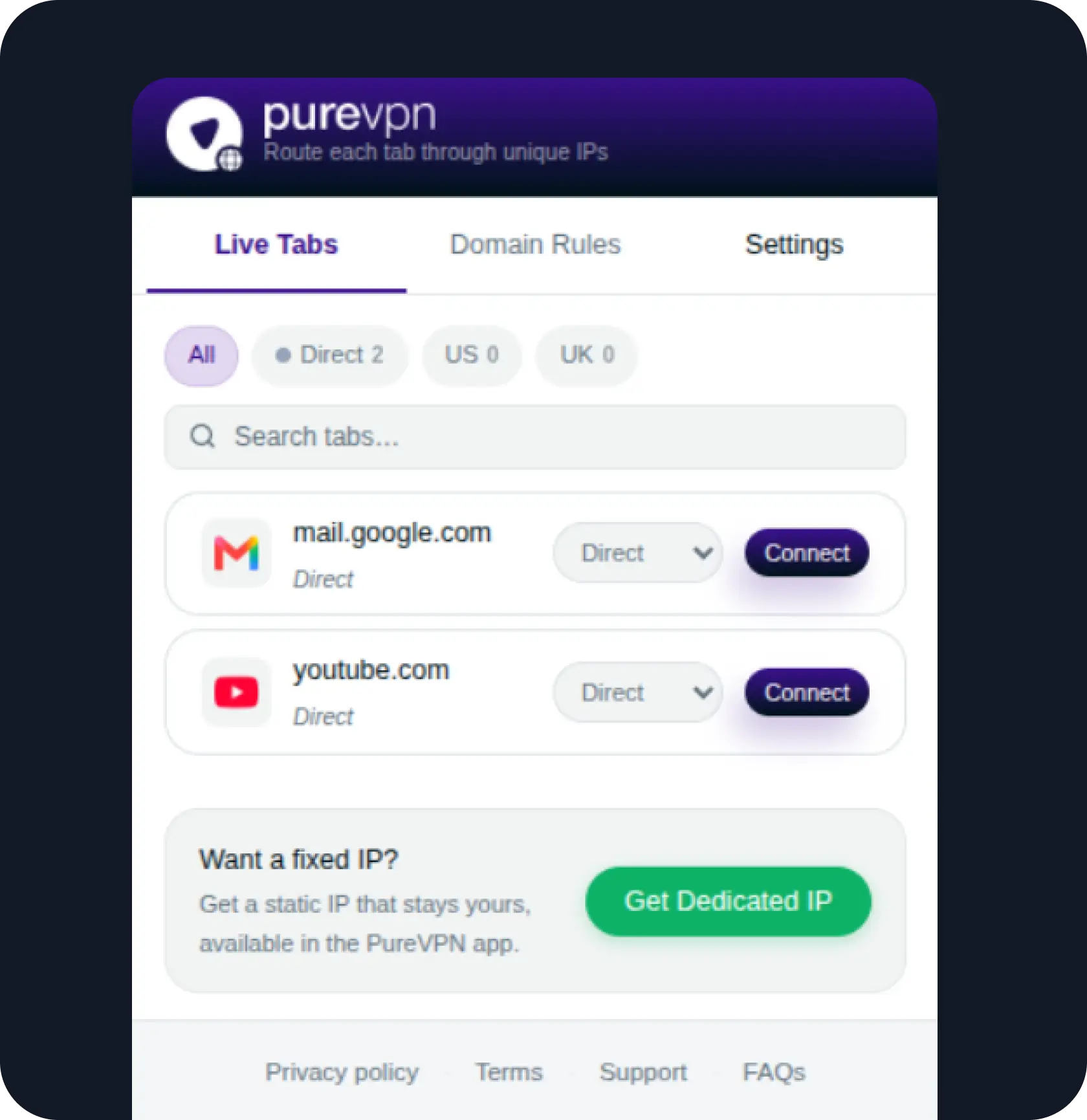
IP Per Tab moves proxy control from the whole browser to the individual tab:

1

Open your tabs

Keep your scrapes, rank checks, ad previews, QA tests, or repeat domains open in regular Chrome.

Dedicated IP Steps Arrow
2

Set the IP for each tab

Choose the residential proxy route you want each tab to use from the extension popup.

Dedicated IP Steps Arrow
3

Work without switching

Each tab keeps its own IP session, so you can continue side by side in the same browser.
Dashboard

What’s Included in IP Per Tab

Per-Tab IP Assignment

Assign a residential proxy IP to individual Chrome tabs instead of changing the proxy setting for the whole browser.

Session Isolation

Keep tabs running simultaneously with separate IP sessions, so one workflow does not interrupt or reset the others.

Domain Rules

Save proxy routes for specific domains, so the right route applies automatically when you return to the same site.

Why Use a Different IP for Each Browser Tab?

Different tabs can have different jobs, and sometimes they need different IPs too. Here is what that looks like for different users:

User
Without IP Per Tab
With IP Per Tab
Web Scrapers
Separate crawls, source checks, and retries share the same IP, so using another one means switching connections
Multiple scraping tasks can run at once without one task interrupting another
E-commerce Sellers
Checking US and UK marketplaces means moving back and forth between locations to review product pages and listings
Pricing, availability, and other marketplace differences are easier to review side by side
Digital Marketers
Campaigns targeting the US and UK need to be checked separately as you move from one location to the other
Both campaign versions can be reviewed in the same pass, from ads and offers to landing pages and funnels
Developers
Regional testing can involve switching connections or splitting US and UK checks across browser profiles and windows
US and UK page behavior can be tested alongside development or staging work in the same browser
SEO Professionals
Working through keywords and competitors across the US and UK requires repeated location changes between searches
Location-sensitive results from both markets can be reviewed together as you work through your SEO checks

Take Control of Your IP, Tab by Tab

Skip manual proxy setup. Route selected Chrome tabs through clean residential IPs with built-in- per-tab IP routing, while the rest of your traffic stays on your original connection.

IP PER TAB

Why Most Browser Proxy Tools Fall Short

Browser proxy tools can change your IP, but managing multiple IPs and sessions is not always straightforward. This is because:

01

One proxy change affects every tab

Browser-wide proxy tools use the same route across your tabs. Switch to another IP for one task, and the other tabs move with it.

02

Different IPs mean more browser profiles

Profile-based tools keep sessions separate, but each one comes with another profile to manage. The more IPs you need, the more cluttered the workflow gets.

03

Parallel tasks are harder to keep separate

When several tasks need different IPs at the same time, you are left switching routes or moving between profiles and windows to keep each session separate.

04

The overhead grows with every new session

More sessions mean more profiles, windows, and proxy routes to keep track of. A simple IP change becomes harder to manage as the workflow grows.

Choose Residential Proxy Plan As Per Your Needs

  • Monthly plan
Best Selling

Residential Proxy

39% off
$2.74

$1.66/GB

What's Included:

Get 12 GB
  • Bandwidth12 GB
  • Free geo-targetingavailable
  • 24/7 Customer Supportavailable
  • 99.9% uptimeavailable
  • Tab-Level IP Routingavailable
  • 100% ethically-sourced proxiesavailable

Residential Proxy

24% off
$2.11

$1.59/GB

What's Included:

Get 25 GB
  • Bandwidth25 GB
  • Free geo-targetingavailable
  • 24/7 Customer Supportavailable
  • 99.9% uptimeavailable
  • Tab-Level IP Routingavailable
  • 100% ethically-sourced proxiesavailable

Residential Proxy

14% off
$1.85

$1.59/GB

What's Included:

Get 50 GB
  • Bandwidth50 GB
  • Free geo-targetingavailable
  • 24/7 Customer Supportavailable
  • 99.9% uptimeavailable
  • Tab-Level IP Routingavailable
  • 100% ethically-sourced proxiesavailable

What's Included:

Bandwidth

12 GB

25 GB

50 GB

Free geo-targeting

Yes

Yes

Yes

24/7 Customer Support

Yes

Yes

Yes

99.9% uptime

Yes

Yes

Yes

Tab-Level IP Routing

Yes

Yes

Yes

100% ethically-sourced proxies

Yes

Yes

Yes

1.Create your account

Password must be 8 characters or longer.

Looking for a VPN to secure your business? Explore PureVPN for teams

mcafee-icon

2.Select Your Payment Method

Enter a valid card holder name.

31-Day money-back guarantee

Order Summary

trust pilot

Secure and Encrypted checkouts

Order Summary

Total

1 month with resident network Monthly plan
$0.00
$0.00

Country Tax:

Austria
VAT 0% $0.00
tickmark
tickmark
tickmark
tickmark
tickmark
tickmark
tickmark
tickmark
tickmark
tickmark
tickmark
tickmark
tickmark
tickmark
tickmark
tickmark
tickmark
tickmark
tickmark
tickmark
tickmark
tickmark
tickmark
tickmark
tickmark
tickmark
tickmark
tickmark
Total $0.00

In case you missed our favorite VPN add-ons

More Than a Proxy Switcher: Proxy Per Tab Control

Most proxy switchers still treat Chrome as one browser with one proxy setting. That works for basic IP changes, but it gets clumsy when different tabs need different residential IPs. PureVPN’s IP Per Tab For Chrome lets users manage separate IP sessions inside the same browser.

Unique per-tab residential IP
Side-by-side sessions
Automatic domain rules
Direct connection per tab
Change routes from extension settings
No manual setup
Built-in clean IP source

PureVPN Logo

Typical
Proxy Switchers

Trusted by 5 million+ satisfied users

Explore What You Can Do With Residential Proxies

Frequently Asked Questions

Find answers to common questions about PureVPN’s Proxy Per Tab Chrome extension here.

Can I use a different IP for each Chrome tab?

plus
plus

IP Per Tab lets each opened tab use its own residential IP route, so separate sessions can run side by side.

Do I need a separate browser or profile for each session?

plus
plus

Not at all. The extension runs inside regular Chrome, so you can manage separate tab sessions without opening another browser or creating extra profiles.

Can I make a specific website always use the same proxy route?

plus
plus

Yes. With Domain Rules, you can save a proxy route for a specific domain so it applies automatically when you return to that site.

Can some tabs use my regular internet connection?

plus
plus

Indeed. You can switch a tab back to your direct connection when you do not want it routed through a residential proxy.

Does it encrypt traffic like a VPN?

plus
plus

This is a Chrome proxy extension, not a VPN. It manages proxy routing inside Chrome and does not encrypt your full device connection.